
5 Things I Tried to Automate in 2026 and Gave Up On — The Honest List

WordPress content automation looked like the obvious move at the start of 2026.
You’ve got n8n, GPT-4, the WordPress REST API, and a list of AI tools that all promise to save hours every week. So I did what any WordPress blogger with too many open tabs would do: I built the workflows.
Four months later, I’ve shut down five of them.
This is not a “wordpress content automation is dead” post. Some automation works well — I’ll tell you what at the end. But these five cost me real time, real money, and in one case a genuinely bad morning staring at an API bill. If you’re planning any of these, here’s what actually happened.
What I tried
- Auto-publishing AI-written posts with n8n + GPT-4
- AI-generated featured images at scale (DALL-E 3 via API)
- Auto-tagging and categorizing posts with AI
- Turning blog posts into social media threads automatically
- Automated internal linking via Link Whisper
1. Auto-publishing AI-written posts with n8n + GPT-4
Automatically publishing AI-written posts saves time in theory. In practice, it creates editing debt that costs more time than writing from scratch.
What I built
A Google Sheet held my keyword list. Every weekday at 8am, an n8n workflow pulled the next keyword, sent it to GPT-4 with a detailed 1,200-word blog post prompt, parsed the JSON response, and pushed it to WordPress as a draft via the REST API.
It worked. Drafts showed up exactly as scheduled.
Why I gave up
Every draft needed 40 to 50 minutes of editing before I’d publish it. The structure was fine. The SEO basics were there. But the posts had no real opinion, no actual example, nothing specific enough to stand out. They read like a confident summary of things any other blog could say.
Fixing that is most of the writing work. I was saving maybe 10 minutes per post while paying $0.50 to $0.80 in GPT-4 API fees per draft.
After 18 drafts, I ran the numbers. Net time saved: close to zero. Content quality: noticeably lower than posts I wrote myself.
What I do instead
GPT-4 for outlines, research summaries, and FAQ drafts. I write the post itself.
2. AI-generated featured images at scale (DALL-E 3 via API)
Generating featured images automatically doesn’t scale the way you’d hope once API costs and image consistency both become problems at the same time.
What I built
An n8n workflow triggered on post publish. It took the post title, sent it to the DALL-E 3 API with a styled prompt, received the image URL, downloaded it, uploaded it to the WordPress media library via REST API, and set it as the featured image automatically.
Technically, this was the cleanest workflow I built. It ran without errors for the first three days.
Why I gave up
Two problems arrived together.
First: the images looked fine individually but felt visually inconsistent across the blog. Different lighting styles, different colour temperatures, different levels of abstraction. In a post grid, it looked like five different designers had worked on the same site.
Second: the cost.
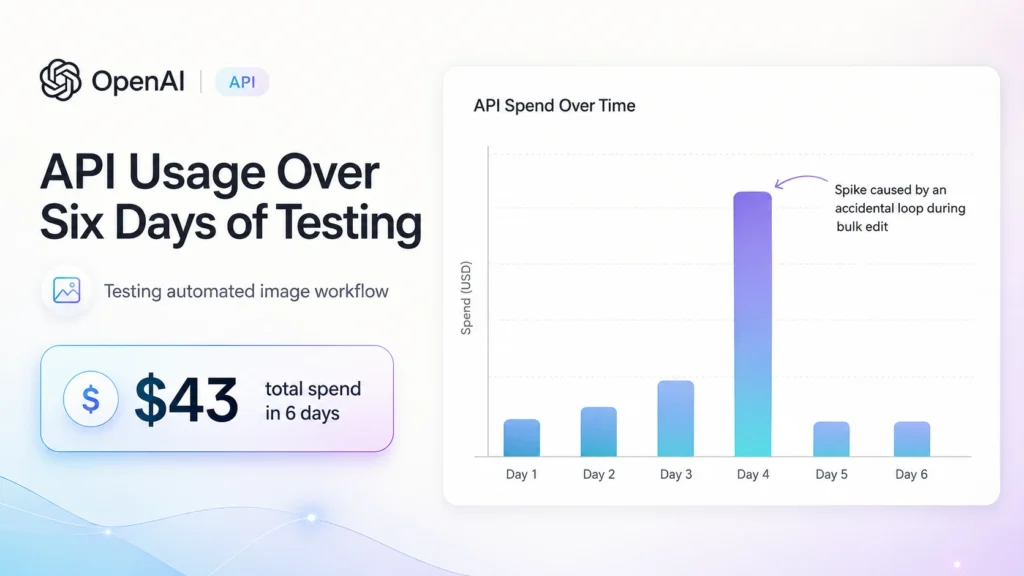
I was doing bulk metadata edits on 60 older posts and didn’t realize the workflow would trigger on every save event — not just new publications. Each save fired a DALL-E 3 API call. The dashboard showed $18.40 charged in about two hours.
The workflow had no rate limiting, no deduplication check, and no cost cap. That’s on me. But it’s also the kind of edge case that automated workflows hit regularly — and when they do, they hit fast.
What I do instead
A Canva template with one editable text layer per post. I customize it manually in about 8 minutes. Consistent style, negligible cost, no surprises.
3. Auto-tagging and categorizing posts with AI
AI-based auto-categorization works accurately for generic content. For a blog with a specific internal structure, it matches your words but not your logic.
What I built
A WordPress action hook on save_post sent post content to GPT-4 via an n8n webhook. The model returned a JSON object with a category name and three to five tag suggestions. An n8n HTTP node then updated the post via the WordPress REST API.
Why I gave up
The category logic broke on anything site-specific. My blog has three clearly separate content areas: WordPress tutorials, n8n workflows, and AI tools. The model kept assigning posts to “WordPress Tutorials” whenever the post mentioned WordPress — even when the subject was clearly an n8n workflow that happened to connect to WordPress.
It didn’t know the difference because it didn’t know my site. It only knew the words.
After two weeks, 47 posts were miscategorized. I spent an afternoon fixing them manually, which effectively canceled every minute the automation had saved.
What I do instead
Manual. It takes 30 seconds per post. The issue was never the time — it was the accuracy.
One exception: I still use the AI tag suggestions as a starting point. Tags are lower-stakes than categories, so a rough suggestion is useful even if it’s not perfect.
4. Turning blog posts into social media threads automatically
Automated content repurposing produces structurally correct social posts that don’t perform, because performance depends on timing and personality — neither of which a scheduled workflow can provide.
What I built
An n8n workflow triggered by new WordPress posts. It sent the full article to GPT-4 with a prompt to write a five-tweet thread and a LinkedIn post. The outputs were pushed via the Twitter/X API and LinkedIn API and posted immediately after publication.
Why I gave up
The threads read like a Wikipedia summary of my own article. Correct information, no personality, no hook in tweet one. My Twitter engagement dropped about 30% over three weeks of running this. Impressions held up — people were seeing the posts — but replies and link clicks fell off a cliff.
LinkedIn was worse. Their algorithm visibly deprioritizes auto-posted content. Native posts — ones drafted inside the app — outperformed the automated ones by more than 2x on every metric, every time.
There was also the API cost side. The Twitter/X Basic tier at $100/month allows limited write calls. Once you’re paying $100 for something that actively hurts engagement, the maths don’t work.
What I do instead
I write Twitter threads manually, once a week. It takes 20 minutes and performs noticeably better. LinkedIn, I draft directly in-app. Both cost nothing except time.
5. Automated internal linking via Link Whisper’s auto-link feature
Auto-applying internal links across a WordPress blog creates linking patterns you would never choose manually — and some you’d actively want to avoid.
What I built
This one required no custom development. Link Whisper Pro includes an auto-link feature that monitors specified keywords throughout your content and automatically inserts links to designated pages. I set up 40 keyword-to-page rules and enabled auto-linking across the whole site.
Why I gave up
The keyword matching is purely literal. “Content automation” triggered a link regardless of whether the surrounding context actually warranted one. I found links being inserted mid-sentence in ways that disrupted reading flow — and worse, connecting posts with no real editorial relationship beyond a shared phrase.
After scanning 30 posts with auto-link active, I found 11 links I’d never have added manually. A few were pointing to posts on completely different topics. For a site trying to recover topical authority, random keyword-matched links are the last thing you want in the structure.
I turned it off immediately and spent time auditing the posts it had already touched.
What I do instead
Link Whisper for suggestions only. The suggestion engine surfaces links I’d genuinely miss — that part is useful. But every suggestion gets reviewed manually before it’s applied. Never auto-apply.
What automation actually works for WordPress blogging
Not everything I tried failed. Here’s what’s still running and earning its place:
- Scheduled publishing. WordPress’s native post scheduler is automation. It works perfectly. Use it.
- Draft formatting from plain text. An n8n workflow that takes a markdown file and converts it into Gutenberg blocks is genuinely useful and low-risk. No judgment required, just mechanical formatting.
- Broken link monitoring. Set-and-forget automation that checks for 404s across live posts. Runs weekly, sends a report. No downside.
- GSC data pulls. n8n → Google Search Console API → a Google Sheet. Useful for monitoring keyword impressions without opening GSC every day.
The pattern I’ve noticed: wordpress content automation works well for monitoring and mechanical tasks — scheduling, checking, formatting, moving data. It consistently breaks down on anything that needs editorial judgment — categorization, creative output, link selection, tone.
Frequently asked questions
Is WordPress content automation worth it in 2026?
For mechanical tasks — scheduling, monitoring, data syncing — yes, it’s worth it. For content creation tasks that require editorial judgment, the output typically needs more human review than the automation saves. The honest answer is: it depends heavily on which task you’re automating.
What’s the best tool for WordPress automation?
n8n is the most flexible for custom workflows that connect WordPress to external APIs and AI models. For simpler tasks, Zapier or Make work without the self-hosting overhead. For scheduling alone, WordPress’s native scheduler needs nothing else.
Can you use AI to write WordPress blog posts automatically?
You can generate drafts, but they need significant editing before they’re worth publishing. In practice, AI-written posts require a similar time investment to writing from a strong outline — the time savings are smaller than expected, and the quality ceiling is lower.
Is n8n good for WordPress automation?
Yes, for technical workflows: data syncing, REST API calls, conditional publishing logic, and monitoring. Less suited to creative or judgment-heavy tasks where the quality of AI output needs to match a specific editorial standard.
I’m still running automation — just fewer, more targeted workflows. The ones that stayed are ones where a wrong output has low consequences and a right output saves real time. The ones I killed were trying to automate things that still need a person making calls.
If you’ve made any of these work in a way I didn’t, I’d genuinely like to know. Leave a comment below or reach out.
