Selenium Grid Online ROI: The Metrics (and Cost Model)

Selenium is free to download, but running it at scale is not. Setting up test automation always starts with code, but it quickly turns into an infrastructure challenge when your team needs to run tests against dozens of browser and operating system combinations.
At this stage, engineering teams face a clear infrastructure choice: build and maintain an on-premise Selenium grid, or pay for an online cloud grid.
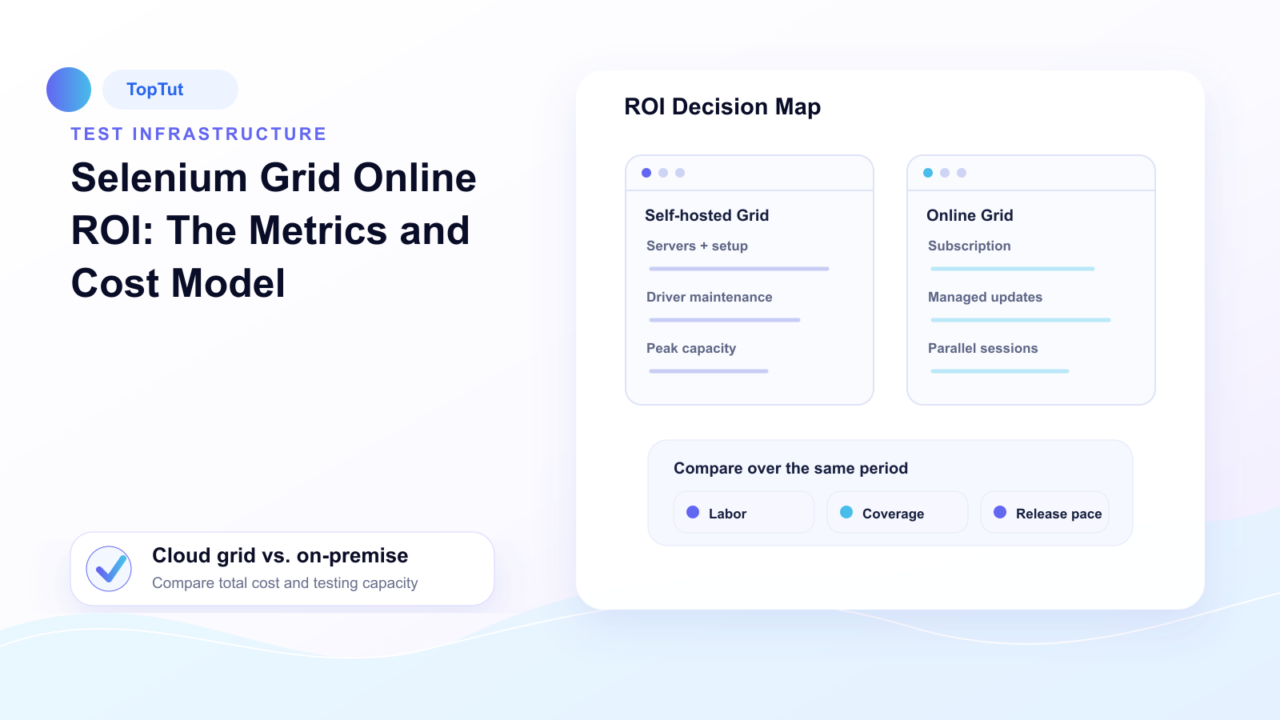
An on-premise grid gives you direct control over your test environment, but it requires continuous maintenance, hardware provisioning, and driver updates. An online grid shifts that maintenance burden to a third party, trading engineering effort for a fixed subscription fee.
Deciding between these options requires looking beyond initial hardware or subscription costs. This guide breaks down the true cost model of both approaches, the metrics that determine your ROI and how to decide which option makes sense for your team.
What Is a Selenium Grid (Online vs. On-Premise)?
A Selenium Grid distributes test execution across multiple machines, or nodes, so tests run against different browsers and operating systems at the same time instead of one after another. This is what makes running a large test suite practical in a reasonable amount of time.
There are two common ways to use a Selenium Grid: online and on-premise.
A selenium grid online is hosted by a cloud provider. The Grid, browser nodes, and infrastructure are already set up and maintained for you. You simply connect your Selenium tests and run them on the browser and operating system combinations you need.
An on premise Selenium Grid runs on infrastructure managed by your own team. You install and configure the Grid, add browser nodes, keep browsers and drivers up to date, and handle scaling as your testing needs grow.
Both options let you run Selenium tests across multiple environments. The difference is who manages the infrastructure. With an online Grid, the provider takes care of setup, maintenance, and scaling. With an on-premise Grid, those responsibilities stay with your team. That difference plays a major role in the overall cost of running your test automation.
What Does an On-Premise Selenium Grid Actually Cost?
Selenium’s license costs nothing, but running it at scale is never free. The total cost breaks down into four main areas:
Infrastructure
You need machines to host the grid, whether physical servers or cloud VMs your team manages directly. Running multiple browsers in parallel across concurrent sessions requires dedicated compute power, not just a single basic instance.
Setup labor
Engineers have to configure the grid, install the right browser versions, set up drivers, and wire everything into your CI/CD pipeline. This requires significant engineering effort before a single test even runs.
Ongoing maintenance
Browsers update constantly, node crashes need manual troubleshooting, and scaling up for large regression runs takes ongoing work. Keeping a self-hosted grid running smoothly often consumes dozens of engineering hours every month.
Flaky test debugging
Selenium suites are known for intermittent failures tied to timing and environment issues rather than actual bugs. Diagnosing whether a failure is real or flaky takes engineering time that’s easy to underestimate when budgeting a grid upfront.
When you add up infrastructure fees, initial setup, monthly maintenance, and debugging overhead, the real cost of a self-hosted grid extends far beyond the initial server bill.
What Does a Selenium Grid Online Cost?
A Selenium Grid online replaces those above four cost categories with a single subscription, typically priced around concurrency, the number of tests you run at the same time, rather than a flat license fee.
This changes what you’re paying for. Instead of buying and maintaining machines, you’re buying access to a fleet the provider already owns and keeps updated. Browser versions, operating system patches, and node scaling happen on their end, which removes the setup labor and ongoing maintenance costs that make up most of an on-premise budget.
TestMu AI’s Selenium Grid Online works this way. You point your existing RemoteWebDriver calls at their hosted grid URL, add your credentials, and your test logic stays exactly as it was, only the infrastructure underneath it changes.
The cost that remains is the subscription itself, and it scales with usage. A small team running occasional tests pays less than a team running hundreds of parallel sessions on every release, which makes the pricing more predictable than an on-premise setup where costs can spike unexpectedly around a hardware refresh or a maintenance emergency.
Key Metrics That Drive Your ROI Decision
Every team uses Selenium differently, so ROI isn’t measured by cost alone. Looking at these key metrics below will give you a much clearer picture of which option makes more sense for your testing needs.
Release Frequency
A team shipping code multiple times a week needs a grid that scales instantly for every pipeline run.
An on-premise setup requires manual provisioning to add capacity, while a cloud grid scales on demand. The more frequently you release, the more that scaling gap turns into lost engineering time or expensive, idle hardware.
Engineering Cost and Maintenance Time
The financial impact of grid maintenance depends entirely on who is doing the work.
Spending 20 hours a month fixing node crashes or updating drivers carries a heavy price tag if senior engineers handle it. That same maintenance load costs significantly less on a team with dedicated infrastructure support.
Required Browser and OS Coverage
Covering three browsers on one operating system is a manageable infrastructure setup.
Covering a dozen combinations across desktop and mobile multiplies the hardware, driver setup, and maintenance work on an on-premise grid. A cloud grid absorbs that expansion into the subscription itself.
Parallel Session Volume
Cloud grid pricing is usually built around concurrency – how many test sessions you run at the exact same time.
A team running a handful of test sessions occasionally pays a very low rate, while a team running hundreds of parallel threads before every release pays more. Base this metric on actual CI/CD logs, not estimates, since concurrency directly dictates your subscription cost.
Compliance and Data Residency
Security rules can override the cost math entirely. Certain industries require test data and execution environments to stay within strict physical or network boundaries. This constraint can narrow or eliminate cloud options, regardless of potential cost savings.
Existing Infrastructure Baseline
Your starting point changes the calculation. A team that already owns server hardware and has engineers experienced in grid management starts from a lower cost baseline than a team building an on-premise setup from scratch.
How to Calculate ROI Between the Two Options?
The comparison comes down to one basic formula: your on-premise total cost of ownership against your cloud subscription cost, both calculated over the same period, usually a year.
Start with the on-premise side. Add up infrastructure spend, setup labor, ongoing maintenance hours, and flaky test debugging time, each converted into a dollar figure using your team’s actual engineering cost. This is the number from the earlier cost breakdown, but built with your specific team’s numbers instead of general estimates.
Next, calculate the cloud side. Take your expected parallel session volume and browser coverage needs, and price that against a cloud grid’s subscription tiers. This number is usually easier to pin down, since it’s based on a published pricing structure rather than variable labor hours.
Compare the two totals directly. If the on-premise total is higher, the cloud grid pays for itself immediately, and the only remaining question is how quickly the switch happens. If the two numbers are close, the metrics from the previous section, release frequency, compliance needs, existing infrastructure, decide which option actually fits, since a small cost difference matters less than a constraint like data residency.
Run this calculation with real numbers from your own team, not industry averages. The published figures on Selenium maintenance and infrastructure cost are useful as a reference point, but your team’s engineering rates, release cadence, and coverage needs are what actually determine the outcome for you.
Which Option Fits Your Team?
The honest answer is that neither option wins by default. It depends on where your team lands on the metrics above.
An on-premise grid tends to fit teams with strict data residency or compliance requirements, existing infrastructure and staff already in place to maintain it, or low, predictable testing volume that doesn’t scale often. If your engineers have spare capacity and your release schedule doesn’t demand constant scaling, the cost of maintaining your own grid can stay reasonable.
A Selenium Grid online tends to fit teams with frequent releases that need instant scaling, broad browser and OS coverage that would be expensive to replicate on owned hardware, or a small team. For most teams without a specific compliance constraint, this is where the cost model in the earlier sections tends to favor the cloud option.
The metrics matter more than a general rule here. A well-resourced team with strict compliance needs may reasonably choose on-premise even at a higher cost, while a lean team with high release frequency will usually see a cloud grid pay for itself within the first year.
FAQs
Is Selenium Grid itself free?
Yes. Selenium is open source under the Apache 2.0 license, and the software costs nothing to download or use. The cost comes from the infrastructure you run it on, not the framework itself.
What’s the difference between a Selenium Grid and Selenium Grid online?
Selenium Grid is the open-source technology that distributes tests across multiple browsers and machines. “Selenium Grid online” refers to a cloud provider hosting that infrastructure for you, so you connect to it remotely instead of running it on your own hardware.
Does the cost model change for smaller teams with occasional testing needs?
Yes. A small team running tests infrequently often finds the maintenance cost of an on-premise grid harder to justify relative to actual usage, since the fixed labor cost of upkeep stays the same regardless of how often the grid runs. A cloud grid’s usage-based pricing tends to fit this pattern more closely.
How quickly does a cloud grid pay for itself compared to on-premise?
It depends on your current on-premise maintenance cost and release frequency. Teams already spending significant engineering hours on grid maintenance tend to see the cost gap close within the first year. Teams with low, stable testing volume may see a longer or less clear payback period.
Does switching to a cloud grid require rewriting existing tests?
No, in most cases. Your test logic stays the same. You typically only change where your WebDriver calls point, from a local grid URL to the cloud provider’s endpoint, along with adding credentials.
Can a team use both on-premise and cloud grids together?
Yes. Some teams run a smaller on-premise grid for routine testing and scale out to a cloud grid during larger regression runs or release periods, which limits the fixed infrastructure cost while still handling peak demand.
Conclusion
Selenium’s license was never the real cost. The infrastructure it runs on is, and that cost shows up as either engineering hours or a subscription bill, depending on which option you choose.
Run the numbers with your own release frequency, team size, and coverage needs, not general estimates. For most teams without a hard compliance constraint, that factor tends to favor a cloud grid. For the rest, the on-premise grid still has a real value.