WordCamp Praha 2017: What I Learned Speaking on WordPress SEO to 200 Real Users

THE HONEST TAKE
I spoke at WordCamp Praha in 2017 on WordPress SEO and walked away with one conviction that has not changed in eight years: 90% of WordPress SEO is boring hygiene – HTTPS done right, clean canonicals, image compression, and one properly configured SEO plugin. The remaining 10% is content that directly answers what people search for. Everything else being sold to you as “the secret” is noise.
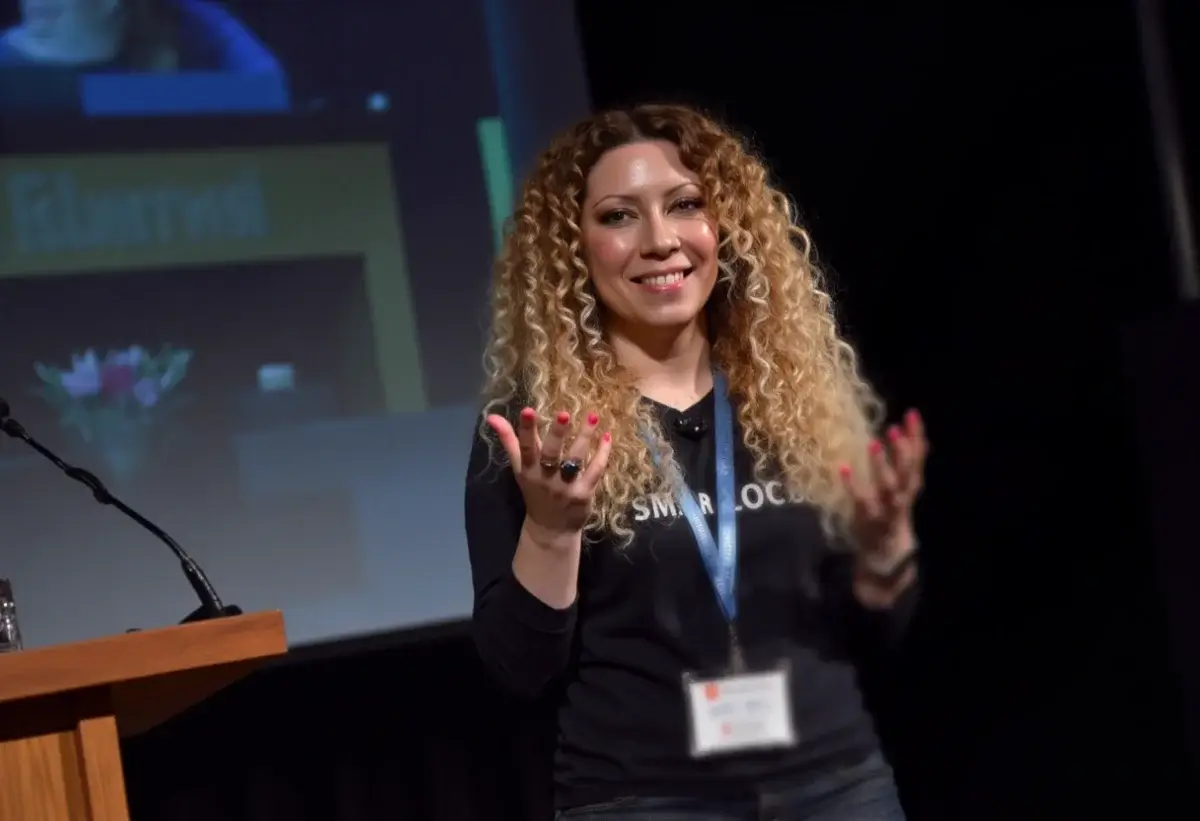
I woke up before my alarm, stared at my slides, and did that pre-talk ritual we all pretend isn’t a ritual: coffee, pacing, one more tweak to a heading that nobody but me would notice. Then I stepped into WordCamp Praha and felt it immediately – the friendly hum of the WordPress community. Lanyards. Stickers. “Hey, I think I use your theme.” The kind of event where you learn three things in the hallway before you’ve even found the first session.
Getting picked, getting ready
A few weeks earlier I’d been selected to speak on SEO optimization for WordPress. I trimmed my deck ruthlessly. No fluff, no SEO mysticism. Just the stuff that moves the needle when you’re wrestling with real sites, real deadlines, and real clients.
My goal was simple: give people a playbook they could use on Monday morning without rewriting their entire website or buying a new plugin zoo.
Why I Was Chosen to Speak
I did not pitch “secret hacks.” I pitched a practical, WordPress-native SEO session people could apply immediately – click paths, checklists, and proofs. That is what got me the nod.
What set my proposal apart:
- Local relevance: I work in Prague and promised CZ/EN-specific examples (hreflang, hosting latency, local SERPs).
- Track record, not theory: I submitted anonymized before/after snapshots – HTTPS migrations, crawl cleanups, speed wins – with exact steps taken in WordPress.
- Show > tell: Live admin demos and a one-page checklist instead of vague “best practices.”
- Community presence: I had been active in meetups and forums, shipping solutions – not just opinions.
- Clear scope and outcomes: A tight agenda (HTTPS done right, mobile-first, canonical sanity, sitemaps/robots hygiene, schema basics) plus time for Q&A and a mini live audit.
| Item | What I pitched | Why organizers cared |
|---|---|---|
| Focus | “WordPress SEO You Can Deploy Today” | Actionable, tool-agnostic, zero fluff |
| Format | Step-by-step wp-admin demos + handout | Attendees leave with a repeatable process |
| Localization | CZ/EN hreflang and market nuances | Directly useful to the Prague audience |
| Proof | Real case snapshots with metrics | Credibility over buzzwords |
| Engagement | Live audit if time allowed | High value, high learning density |
In short: concrete, local, verifiable, and immediately useful – the exact mix WordCamp audiences and organizers appreciate.
The room, the vibe
Prague showed up. Developers, content folks, freelancers, agency teams – the full WordPress mix. The volunteers ran things like clockwork. Questions were sharp but kind. That is the thing about WordCamps: you are never talking at the crowd; you are talking with people who ship.
I cracked a small joke about sliders (controversial!) and we were off.
What I shared (the short version)
I focused on fundamentals that are boring to talk about and beautiful in the analytics:
- Migrate to HTTPS correctly. No half measures, clean 301s, fix mixed content the same day.
- Think mobile-first. Responsive, readable, tappable. Check real phones, not just dev tools.
- Tidy permalinks and canonicals. Fewer crawl headaches, clearer signals.
- Speed as a ranking signal. Cache smart, compress images, defer the shiny stuff.
- Sitemaps, robots, schema. Help crawlers help you.
- International sites. Hreflang that actually works – no language cannibalization.
- Prune thin content. Redirect, consolidate, or remove it.
To make it concrete, I did a mini live audit: cut a heavy hero image, resized others, moved a third-party script below the fold. Instant improvement. Eyes lit up. That is my favorite part.
The questions that mattered
- Do we need two SEO plugins? No. Pick one reputable plugin and configure it properly.
- Is AMP mandatory? Not for most sites. Fix fundamentals first.
- How many plugins is “too many”? Wrong question. Ask which ones ship code on the front end.
- Can we switch to HTTPS without losing rankings? Yes – if your redirects are perfect and you clean up everything on day one.
The community bit (the best bit)
Between sessions, people traded real war stories: multilingual snafus, caching that worked too well, the plugin that broke right before a client meeting. Someone shared a snippet that fixed a breadcrumb loop. That generosity is why I love WordPress – people build in public, then hand you the blueprint.
What I learned as a speaker
- Show your clicks. A 10-second on-screen click path beats a 10-minute theory.
- Local nuance wins. Czech/English hreflang, hosting latency, searcher intent by market – worth the extra preparation time.
- Cut 20% of your slides. Use the time for Q&A. That is where the magic happens.
- Give a takeaway. I handed out a one-pager. People still email me about it.
My 2017 SEO checklist that still holds up
| Task | Why it still matters | Quick tip |
|---|---|---|
| HTTPS + perfect 301s | Trust, speed, consolidated signals | Test every legacy URL path |
| Mobile UX first | Most traffic is mobile | Big tap targets, readable fonts, no tiny modals |
| Image discipline | Largest files, biggest wins | WebP/AVIF + proper dimensions + srcset |
| Lean home page | Faster LCP = happier users | Kill a carousel, gain a second |
| Single SEO plugin | Reduce conflicts | Configure once, audit yearly |
| Sitemap + robots | Better discovery | Keep junk out of the index |
| Canonicals and archives | Prevent duplicates | Noindex thin taxonomies |
| Hreflang that works | Stops language cannibalization | Validate with real SERP checks |
| Content pruning | Lift sitewide quality | Redirect to the best equivalent |
The afterglow
After my session, I found myself in the hallway for nearly an hour answering follow-ups, swapping site audits, and collecting notebook scribbles I still use. Later, over coffee, a developer told me the live audit convinced his client to ditch a heavy slider. That alone was worth the prep.

If you’re speaking at a WordCamp soon
- Rehearse out loud. Not just in your head.
- Bring examples from real sites. People can smell theory.
- Time-box everything. Leave room for questions.
- Stick around. The hallway track is half the conference.
I left WordCamp Praha tired, caffeinated, and genuinely energized. The talks were great, sure – but the real story was the people. Smart. Helpful. Curious. The kind of community that will debate taxonomy archives, then help you fix yours on the spot.

Would I do it again? In a heartbeat. Same city, same crowd, same mission: keep WordPress fast, findable, and friendly – one less carousel at a time.
WordPress SEO Questions From the Audience
What is the single most important WordPress SEO improvement to make first?
HTTPS with perfect 301 redirects. Not because HTTPS alone is a massive ranking factor, but because every other SEO improvement you make is undermined by a broken migration. Mixed content warnings, duplicate HTTP/HTTPS versions, and partial redirect chains all leak signals. Get the foundation clean before touching anything else.
Do you need two SEO plugins on a WordPress site?
No. Pick Yoast or RankMath, configure it properly once, and audit the configuration once a year. Running two SEO plugins creates meta tag conflicts that confuse crawlers and can cause your canonical signals to be ignored entirely. I have cleaned up this mess on multiple sites. One plugin, properly configured, is everything.
How many WordPress plugins is too many?
The number of plugins is the wrong metric entirely. The right question is: how many plugins ship JavaScript, CSS, or database queries on the frontend? A site with 40 backend-only plugins can outperform a site with 8 bloated frontend plugins. Audit with Query Monitor and eliminate anything loading assets on pages that do not need them.
How do you implement hreflang correctly for Czech and English sites?
Implement hreflang in the HTML header, not just via sitemap. Use exact language and region codes (cs, en-GB, en-US as appropriate). Validate with actual SERP checks in each target market after deployment. Google ignoring your hreflang is almost always a syntax error or a missing self-referential tag on one of the language versions.
What was the most valuable lesson from speaking at WordCamp Praha?
That developers and content writers want the same outcome but speak entirely different languages about it. Developers say “canonicals are set.” Content writers do not know what a canonical tag is. The best SEO work since that talk has been translation work – getting technical implementation and content strategy right at exactly the same time, with the same people in the room.
{
“@context”: “https://schema.org”,
“@type”: “FAQPage”,
“mainEntity”: [
{
“@type”: “Question”,
“name”: “What is the single most important WordPress SEO improvement to make first?”,
“acceptedAnswer”: {
“@type”: “Answer”,
“text”: “HTTPS with perfect 301 redirects. Every other SEO improvement is undermined by a broken migration. Mixed content warnings and duplicate HTTP/HTTPS versions leak signals. Get the foundation clean before touching anything else.”
}
},
{
“@type”: “Question”,
“name”: “Do you need two SEO plugins on a WordPress site?”,
“acceptedAnswer”: {
“@type”: “Answer”,
“text”: “No. Pick Yoast or RankMath, configure it properly once, and audit it once a year. Running two SEO plugins creates meta tag conflicts that can cause canonical signals to be ignored entirely.”
}
},
{
“@type”: “Question”,
“name”: “How many WordPress plugins is too many?”,
“acceptedAnswer”: {
“@type”: “Answer”,
“text”: “The number is the wrong metric. The right question is how many plugins ship JavaScript, CSS, or database queries on the frontend. Audit with Query Monitor and eliminate anything loading assets on pages that do not need them.”
}
},
{
“@type”: “Question”,
“name”: “How do you implement hreflang correctly for Czech and English sites?”,
“acceptedAnswer”: {
“@type”: “Answer”,
“text”: “Implement hreflang in the HTML header. Use exact language and region codes. Validate with actual SERP checks. Google ignoring your hreflang is almost always a syntax error or a missing self-referential tag.”
}
},
{
“@type”: “Question”,
“name”: “What was the most valuable lesson from speaking at WordCamp Praha?”,
“acceptedAnswer”: {
“@type”: “Answer”,
“text”: “That developers and content writers want the same outcome but speak different languages. The best SEO work is translation work – getting technical implementation and content strategy right at exactly the same time.”
}
}
]
}