UTM Tracking in GA4: Turn Campaign Links into Better Marketing Decisions

You can publish a useful guide, promote it through email and share it with partners, yet still struggle to explain which activity produced valuable leads. Google Analytics 4, or GA4, helps you measure website activity. Clear campaign labels help you connect that activity to your marketing decisions.
Measurement also needs to respect your audience. In a 2023 Pew Research Center survey, 73% of U.S. adults said they had little or no control over what companies did with their data. Your goal should be useful, transparent measurement, not collecting every detail about every visitor.
The marketing question behind each campaign
Campaign reports often contain plenty of numbers but few clear answers. Your newsletter platform reports clicks, your social account reports engagement, and GA4 reports sessions, which are groups of website interactions within a visit. These measurements describe different activities, so they do not automatically explain which promotion helped your business.
Imagine that you launch a WordPress setup guide through a newsletter, a social post and a partner website. Each channel sends visitors to the same landing page. Without consistent campaign labels and a defined outcome, you may know that traffic increased without knowing which channel attracted readers who requested your services.
A useful starting point is one question: “Which channel brings qualified enquiries for this guide?” A qualified enquiry is a contact who meets your stated customer criteria, rather than someone who submits any form.
You can then define the outcome before creating links. For example, your website might record a successful enquiry submission, while your customer relationship management system records whether that enquiry fits your service.
This approach works because it connects the campaign to a decision. Instead of asking whether traffic increased, you can ask whether a channel deserves more budget, a different message or a better landing page. We gain more value from analytics when we decide what evidence we need before collecting it.
Consistent campaign links make reporting easier
Small naming differences can create large reporting problems. One colleague might label a newsletter source newsletter, another might use email_list, and a third might enter the name of your email software. All three links can work for readers while dividing your results into separate categories.
The problem becomes harder when campaign names also change between channels. If your email uses guide_launch and your partner uses wordpress_offer, you must reconstruct the relationship later. A consistent link-building process keeps those connections visible from the start.
SparkTraffic is a website traffic platform that also offers a free campaign-link tool. Its UTM builder for Google Analytics 4 runs in your browser without an account and previews the channel GA4 is likely to assign. That makes it useful for checking a shared naming system before your team distributes links.
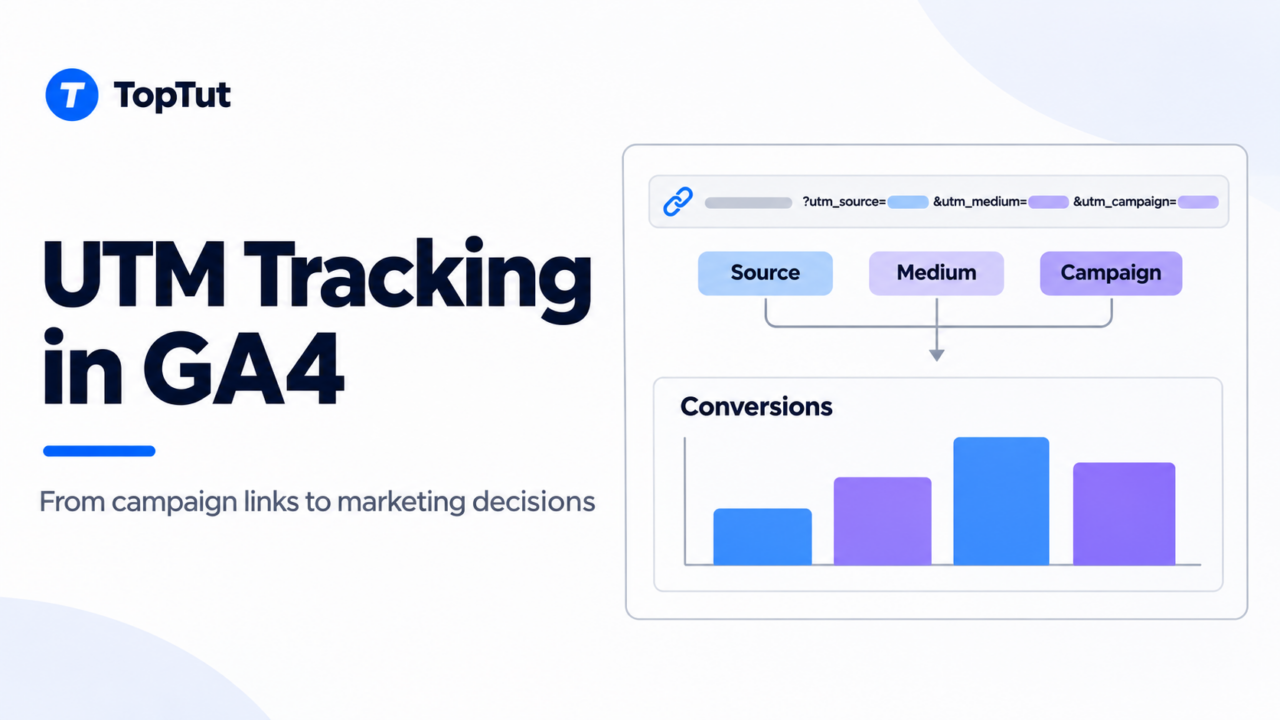
UTM stands for Urchin Tracking Module. Wikipedia’s UTM overview explains how these URL parameters identify the campaigns and sources associated with incoming traffic. A parameter is simply a label added to a web address.
Five common labels cover most everyday campaign needs:
- utm_source identifies the sender or platform, such as newsletter or linkedin.
- utm_medium identifies the marketing channel type, such as email, social or referral.
- utm_campaign groups links under one initiative, such as 2026_11_wordpress_guide.
- utm_content distinguishes placements or creative versions, such as hero_button.
- utm_term commonly identifies a paid-search keyword.
For your guide launch, the newsletter link could look like this:
text
The partner link can use a different source and medium while keeping the same campaign name. This allows you to compare distribution channels within one initiative.
A shared naming sheet helps your team use lowercase values and one separator consistently. The University of Minnesota’s UTM guidelines recommend lowercase naming and a shared spreadsheet. Consistency matters because capitalization differences can split values in analytics reports.
Your campaign name should describe the initiative, not repeat every channel detail. Keeping channel information in source and medium preserves a clean campaign total and makes cross-channel comparisons easier.
Testing tagged links on your WordPress website
A correctly formatted link can still lose its tracking information before GA4 records the visit. A redirect may remove query parameters, which are the values after the question mark. A shortening service may point to an outdated destination, or a copied link may place tracking labels after a fragment beginning with #.
For example, a link to a pricing section might contain #plans. UTM parameters belong before that fragment. If the parameters appear after it, they become part of the fragment rather than the query string your tracking setup expects.
A practical test follows the full route that your reader will take. You can open the final published or shortened link in a fresh browser session, confirm that it reaches the correct page, and check whether the parameters survive any redirects.
Where your consent settings permit analytics collection, GA4 Realtime or DebugView can help you confirm that activity is reaching the property. After standard reports process the visit, the Traffic acquisition report lets you inspect session-level source, medium and campaign values.
Your test also needs to account for internal-traffic filters. A visit from your office may be excluded intentionally, so an absent test visit does not always indicate a broken link.
On WordPress, duplicate analytics installations create another risk. If a theme, a plugin and a tag manager all load the same measurement code, some interactions may be recorded more than once. One documented tracking setup makes errors easier to diagnose.
The link log can include the destination, source, medium, campaign, placement and test status. This record gives future colleagues a reliable reference and reduces the chance that an old campaign link gets reused for a new promotion.
Comparing qualified outcomes instead of visit totals
High traffic can make a weak campaign look successful. A broad social post may attract curious readers who have no interest in your offer, while a smaller partner placement reaches people with an immediate need. Session totals alone reward volume without showing whether the audience is relevant.
Consider a hypothetical guide campaign. Your newsletter produces 200 sessions, 12 enquiries and three qualified leads at a campaign cost of $180. A partner placement produces 100 sessions, 10 enquiries and five qualified leads at a cost of $150.
The newsletter’s qualified-lead rate is 1.5%, and its cost per qualified lead is $60. The partner’s rate is 5%, and its cost per qualified lead is $30. The partner sends fewer visits but produces more qualified opportunities in this example.
Your comparison becomes more useful when each channel has the same qualification rules and reporting period. Otherwise, one channel may appear stronger because its leads received faster follow-up or because its campaign has been running longer.
GA4 uses key events to identify interactions that matter to your business. A successful enquiry submission can be a key event, but a button click alone may not prove that anyone completed the form. Measuring the completed action reduces the risk of treating intention as an outcome.
Acquisition reports answer different questions
A returning reader can first discover your website through search and later respond to a newsletter. The First user source describes how GA4 originally acquired that user. The Session source describes the source associated with the start of a particular session.
For a newsletter launch review, session-level campaign dimensions usually match the question more closely than first-user dimensions. For a review of where new audiences originate, first-user reporting can be more useful.
Choosing the right scope prevents a common mistake: comparing campaign activity against a report that answers a different question. Your report should follow your decision, rather than forcing your decision to follow the default dashboard.
Accurate campaign tracking with clear privacy limits
More labels do not automatically produce better evidence. Teams sometimes add internal UTM links, personal identifiers and highly specific campaign names because they want extra detail. These additions can confuse attribution, expose sensitive information and make reports harder to maintain.
For example, a homepage banner tagged as a new campaign mixes internal navigation with external acquisition. An email address placed in utm_content creates a separate privacy problem because URLs can appear in browser histories, logs and shared messages.
UTM tags are best reserved for external campaign distribution. Internal banner performance can use a dedicated click event or promotion event instead. This separates the question “What brought someone here?” from “What did they interact with after arriving?”
There is an important GA4 distinction: encountering new campaign parameters during an existing session does not automatically start another session. However, those parameters can affect event-level campaign information. Avoiding internal UTMs keeps those signals clearer without relying on outdated session advice.
Generic campaign labels also protect your readers. Values such as newsletter, guide_launch and footer_button describe marketing activity without identifying a person. Names, email addresses, phone numbers and sensitive customer details do not belong in campaign URLs.
The UK Information Commissioner’s Office explains that link decoration, which means adding information to URLs, can serve different tracking purposes. Applicable privacy requirements depend on the technology, purpose and whether personal data is involved. A campaign label is not blanket permission for identity tracking or retargeting.
Health, financial and legal businesses need extra care. A label that reveals a medical condition or financial difficulty can expose information about a visitor even without including their name. Neutral campaign names and a review of the full tracking setup reduce that risk.
Using campaign evidence to improve the next launch
A campaign can underperform for several reasons that UTM tags alone cannot explain. The channel may reach the wrong audience, the message may promise something the landing page does not deliver, or the enquiry form may ask for too much information. A source label identifies where a visit came from, not why the visitor acted.
Suppose a partner sends relevant readers, but few complete your form. Moving the budget immediately could discard a useful audience. A review of the page and its offer may reveal that visitors expected a free guide but encountered a sales request before receiving it.
Your next test should address the most likely cause. If the message and page disagree, improving that match gives you a clearer test than adding more tracking labels. Human-first marketing means that the promise in the link should match the experience after the click.
Creative comparisons that keep campaign totals intact
Two newsletter buttons can produce different results, but separate campaign names make the launch harder to review as a whole. A label such as hero_button for one placement and footer_button for another keeps the detail at the content level.
Using utm_content for these differences preserves one campaign total while allowing placement comparisons. Your interpretation still needs context: the first button may receive more clicks because more readers see it, not because its wording is better.
A planned test that changes one main element provides stronger evidence than comparing several unrelated changes. The practical benefit is a result you can explain and repeat.
Campaign attribution is not proof of additional impact
A tagged visit shows an observed connection between a link and website activity. It does not prove that the campaign caused a sale that would otherwise never have happened. A loyal customer may have purchased without the newsletter, and consent choices can leave some activity unobserved.
For larger budget decisions, you can combine campaign reports with customer feedback or controlled tests. A holdout group, which is a comparable group that does not receive the campaign, can help estimate additional impact when the test is feasible and appropriate.
UTM tags provide the labels for a useful decision process. Clear naming, reliable testing and meaningful outcomes provide the quality. Your audience remains the priority: relevant messages and honest landing pages create the value that your analytics should measure.